
As teams increasingly work from home or in hybrid setups, leaders must master delivering training online. Virtual sessions can be just as impactful as in-person workshops – if done right. Skilled facilitators engage participants, leverage technology effectively, and structure content for a remote audience.
This guide offers detailed, actionable tips and techniques on how you, as a leader or trainer, can make your virtual training sessions more effective and engaging. We'll cover preparation, engagement strategies, content design, tools, and common pitfalls to avoid.
Why Virtual Training Skills Matter?
Remote and hybrid work arrangements are here to stay. By 2026, flexible work (hybrid or remote) options will be mainstream – only about 25% of employers offer a fully in-office environment. As a leader or trainer, you need to keep your team aligned and skilled even when you’re not together in a room. Yet many managers find virtual settings challenging: only 30% of leaders feel effective leading virtual teams, and a recent survey found 72% of L&D professionals cite learner engagement as their top virtual training challenge.
A successful virtual trainer combines clear communication with human-centered leadership. You must set expectations, build trust, and cultivate psychological safety so participants feel comfortable contributing at a distance. Effective virtual training isn't just about pushing content through a screen; it’s about connecting purpose and performance. That means defining clear goals, explaining why the session matters, and continuously adapting to learners’ needs. As one expert notes, “Establishing trust… requires even greater intentionality in virtual mediums”.
Keep these big-picture ideas in mind as you prepare and deliver each session. Now let’s look at concrete steps to ensure your next virtual training is a success.
10 Virtual Training Tips and Tricks for Leaders
When it comes to leading online sessions, tools matter — but strategy matters more. The most effective leaders don’t just know how to use platforms. They know how to create impact through intentional design.
Below are proven virtual training tips and tricks you can apply immediately to make sessions impactful and professional.
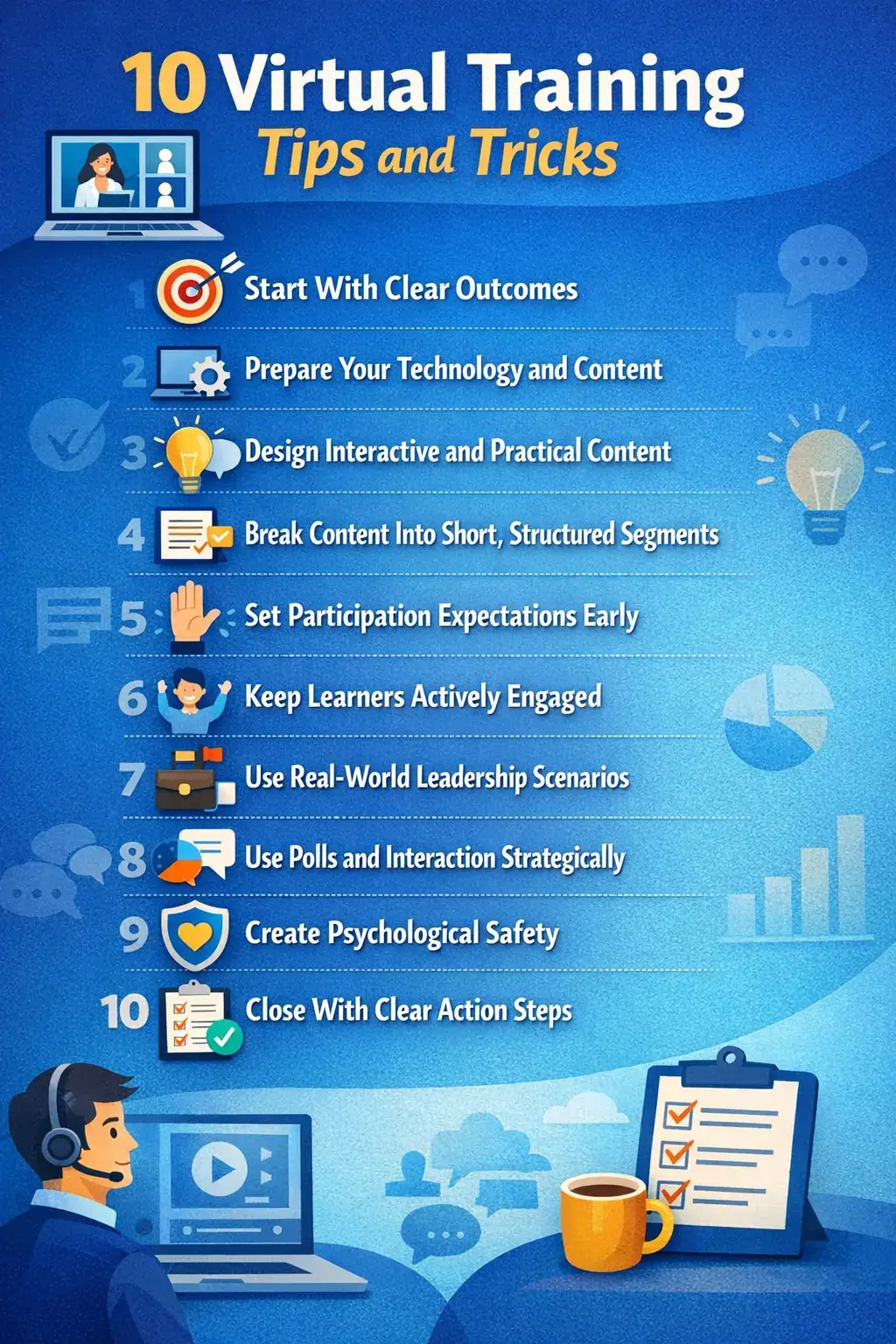
1. Start With Clear Outcomes
Before building slides, define what success looks like. What should participants know or do differently after the session? Outcome-driven planning keeps your training focused and relevant. When leaders communicate clear objectives upfront, engagement improves and participants understand the real business value behind the session.
2. Prepare Your Technology and Content
Professional delivery builds credibility. Test your internet connection, microphone, camera, and screen-sharing tools well in advance. Run a rehearsal to ensure you can navigate slides, polls, and breakout rooms smoothly.
Send the agenda and any pre-work before the session. When participants arrive prepared, live time becomes more productive. Preparation eliminates unnecessary distractions and builds confidence on both sides of the screen.
Ready for more? Check out our Delivering Virtual Presentations course to sharpen your online presentation skills. It covers visual design, tone, and platform tricks to keep audiences engaged.
3. Design Interactive and Practical Content
Virtual learners disengage quickly from dense slides and long explanations. Replace heavy text with visuals, key phrases, and leadership-relevant scenarios.
After introducing a concept, immediately shift to application. Ask participants how they would implement the idea in their role. Practical relevance transforms content into meaningful learning.
4. Break Content Into Short, Structured Segments
Virtual attention drops quickly. Divide your session into focused 8–12 minute segments followed by interaction. This prevents overload and keeps energy consistent. Short, structured delivery is one of the most effective virtual training techniques for maintaining focus and improving retention.
5. Set Participation Expectations Early
At the beginning of your session, clarify how participants should engage. Explain when to use chat, when to unmute, and whether cameras are encouraged.
Clear expectations reduce hesitation and create psychological structure. When people understand how to contribute, they are more likely to participate confidently.
6: Keep Learners Actively Engaged
Virtual environments require intentional engagement. Avoid extended monologues. Incorporate interaction regularly through questions, chat prompts, short discussions, or breakout activities.
Call participants by name to personalize engagement and maintain focus. Active involvement increases retention and reduces multitasking — a common virtual training challenge.
Expand your facilitation toolkit: See our Presenting and Facilitating Virtually course. It covers interactive tech tricks and group dynamics for online training, giving you more ways to engage every learner.
7. Use Real-World Leadership Scenarios
Theory alone won’t drive behavior change. Introduce practical scenarios that reflect real workplace challenges. Ask participants how they would respond and facilitate discussion. When learning connects directly to daily leadership responsibilities, engagement increases and application becomes immediate.
8. Use Polls and Interaction Strategically
Interactive tools should reinforce learning, not distract from it. Use polls to check understanding, gather insights, or spark discussion.
Follow up by analyzing results together. Strategic interaction strengthens engagement and keeps participants actively involved.
9. Create Psychological Safety
Participants engage more when they feel safe sharing ideas. Encourage questions, acknowledge contributions positively, and normalize different viewpoints. A supportive tone builds trust. Psychological safety is critical for effective virtual training tips for leaders because it drives open dialogue.
10. Close With Clear Action Steps
End every session with clear next steps. Ask participants to identify one action they will implement immediately.
Training without application rarely creates impact. Practical commitments increase accountability and ensure learning translates into performance improvement.
Common Challenges and Solutions
Even with planning, virtual training has hurdles. Be aware and prepared for these common issues:
Technical glitches are inevitable. Always have a backup plan. Test audio and video at the start, and keep an alternative dial-in option ready. Sharing slides in advance ensures learning continues even if the platform fails. If possible, assign a co-host to manage technical issues so you can stay focused on delivery.
Engagement drop-off happens quickly online. Break sessions into manageable segments and rotate between presentation, discussion, and polls. If energy dips, introduce a quick interactive prompt or light question to reset attention. Small shifts can dramatically restore focus.
Virtual fatigue is real. Schedule short breaks every hour and keep sessions concise. Let participants know it’s acceptable to stretch or step away briefly. Providing slides or summaries reduces pressure to multitask and supports well-being.
Time zone conflicts can limit attendance. When working with distributed teams, record sessions and provide materials afterward. Offer asynchronous follow-up options to ensure inclusivity.
Low rapport and participation can also affect outcomes. Start with brief icebreakers and acknowledge contributions by name. Recognition builds confidence and encourages broader engagement.
Finally, relevance drives retention. Tailor examples to real workplace scenarios. When participants see direct application, motivation increases.
Like any leadership skill, virtual training improves with reflection. Gather feedback, evaluate what worked, and refine your approach consistently.
Frequently Asked Questions
1. What are effective virtual training techniques to engage learners?
Use a mix of methods. For example, alternate mini-lectures with polls, Q&A, or breakout discussions every 5-10 minutes. Encourage participation via chat or voice. Set clear expectations. Include real-world examples and stories. These techniques keep learners active instead of passive listeners.
2. How do I keep virtual training sessions interactive and not just lecture?
Plan regular interactions. After explaining a point, stop for an activity: a poll, a quick quiz, or ask participants to discuss something in pairs. Invite learners to type answers in chat or unmute to speak. One trainer recommends never lecturing more than about 10 minutes without an activity. These pauses maintain attention and make the session feel like a two-way conversation.
3. What skills should a virtual trainer have?
Besides subject expertise, virtual trainers need strong tech skills and communication skills. You should be comfortable with the platform. Be clear and concise in speech. Use friendly, animated tone and body language so learners feel connected. Patience and adaptability are crucial – you may need to pivot if tech issues arise. And keep learning: watch recordings of your sessions to improve.
4. How can leaders measure virtual training effectiveness?
Use feedback and outcomes. Immediately after the session, survey participants on what they learned and how engaging it was. Check participation metrics. More importantly, observe if skills are applied on the job: follow up in team meetings or via quick quizzes a week later. One-on-one check-ins can reveal if training made an impact. Combining these methods shows you both short-term and long-term effectiveness.
5. How often should I train remote teams virtually?
Quality over quantity. Sessions shouldn’t drag on – it’s better to split learning into shorter chunks. For example, break a full-day workshop into two half-days a week apart. You can also spread learning over time: a series of weekly 1-hour modules with practice in between. Spacing out sessions helps retention and avoids Zoom fatigue. Supplement live training with micro-content to reinforce key points over time.
Conclusion
Leading effective virtual training requires more than technical knowledge. It demands thoughtful preparation, intentional engagement, and a strong human connection. When you plan strategically, encourage participation, and design interactive learning experiences, you help your team stay aligned and productive — no matter where they work.
Set clear goals. Foster trust. Make every session relevant and practical. When you consistently apply these Virtual Training Tips and Tricks, your virtual sessions become more than meetings — they become meaningful learning experiences.
Strengthen Your Virtual Leadership Skills
If you’re ready to take your virtual training and leadership capabilities to the next level, structured development makes the difference.
PTR Training offers practical, results-driven programs designed specifically for leaders working in virtual environments:
- Delivering Live and Virtual Presentations – Build confidence and polish in online communication.
- Leading Virtual and Remote Teams – Strengthen leadership strategies for distributed teams.
- Leading Virtual Meetings – Run focused, productive, and engaging virtual sessions.
Each program includes real-world examples, interactive learning, and actionable strategies you can apply immediately.
Invest in your virtual leadership skills today — because effective remote training isn’t optional anymore. It’s essential.